


Environment
A web environment consists of two main components: a Web browser and a Web server.

In addition, most Web environments contain dynamic processing capabilities which are typically performed by applications, often in conjunction with database servers.
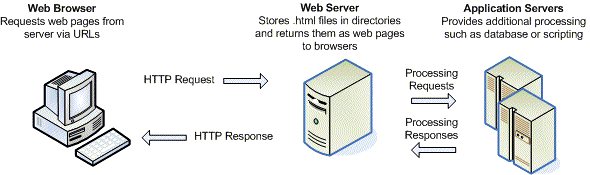
If a Web site consists solely of static HTML pages, the Web designer does not need to be concerned with the environment because all Web servers “understand” HTML. However, this is not true of XML. Web servers need additional code to instruct them how to process XML files — identifying where XML files are found and directing them to XSL files to transform those XML files into the requested format (e.g., an HTML Web page). The code invokes the appropriate XML parser and XSL processor on the server to enact this transformation.
The Modest, Moderate, and Elaborate examples below walk you through different approaches to making XML work in a variety of web environments — at least one of which should fit your environment.
Modest
This approach provides instructions on how to process XML files on the desktop and save the HTML Web pages produced by the XSL, using either a Web browser or an XML editor such as XMLSpy or <oXygen/>. The HTML pages are then uploaded to a Web server as done with other HTML pages. Anyone can take advantage of XML using this approach, regardless of the Web server environment.
Moderate
Here are relatively simple approaches to processing XML/XSL files on a Web server while delivering HTML pages to the users' browsers. The examples employ basic scripts that direct a Web server in processing XML files. The examples provide code for ASP (VB Script), ASP.NET (C#), PHP, JSP, Java Filter, ColdFusion, and Dreamweaver — which cover virtually every Web server environment.
Elaborate
In this example, the moderate approach is taken a few steps further. More complex scripts are introduced to handle parameters passed between the browser, Web server, and XSL files.